With the rising cost of education, a Coverdell Education Savings Account (CESA) can be a powerful tool to help combat education expenses, potentially reduce dependence on financial aid, and receive tax benefits. Understand how a CESA works, eligibility, how you can grow your CESA and more to see if this account may be right for you.
1. What is a Coverdell Education Savings Account (CESA)?
A Coverdell ESA is an account set up for paying qualified education expenses for a designated beneficiary, according to the IRS.
2. How does a self-directed CESA work?
Equity Trust offers a self-directed CESA, which allows you to invest in almost any asset, tax free or tax deferred, while saving for education costs. Investing funds contributed to a CESA may potentially lead to the overall growth of the account, in a tax-advantaged fashion.
Many Equity Trust clients are primarily investing in alternative assets, beyond traditional stocks, bonds and mutual funds. Some of these alternatives include real estate, private lending, promissory notes, tax liens and many others.
A Self-Directed CESA Case Study
Brian opened Coverdell accounts for each of his four children. He saw the savings potential: money saved in a CESA can be withdrawn tax-free when used for qualified education expenses.
An active real estate investor, Brian decided to try to grow his children’s accounts using self-directed CESAs.
A CESA’s annual contribution limit is $2,000. Brian was concerned that it would take a while to build up enough capital in the account to be able to invest in real estate. His purchasing power increased when he learned that he could partner with other self-directed accounts to make investments.
Brian thought it would be difficult to find a suitable investment property for less than $50,000 in the city of Nashville, but before long he found a vacant lot in the city for $8,000.
He partnered three of his children’s self-directed CESA accounts to purchase the lot. One child’s CESA invested $4,000, and his two other children’s CESAs each invested $2,000.
Brian saw potential in the lot because he spotted new housing construction nearby, as well as a mobile home park that was on the market.
“As I reviewed the potential of the area, I believed the value was going to change once they sold that mobile home park,” Brian recalls. “Once the mobile home park sold, additional houses were built continuing to push values up.”
The land was sold 60 days later for $60,000. The sale proceeds returned the CESA accounts in the same proportion as was used for the purchase.
Brian had been investing in real estate for a while before he was aware that he could self-direct his retirement account, CESA or other accounts into real estate and other alternative investments.
Between his and his wife’s retirement accounts and his children’s CESAs, Brian’s family now has a total of eight accounts at Equity Trust.
Video: Coverdell Education Savings Account FAQs
3. What can a Coverdell Education Savings Account be used for?
A CESA can be used to fund qualified education expenses recognized by the Department of Education through an accredited institution.
According to IRS Publication 970, the expenses can be either qualified for higher education expenses or qualified elementary and secondary education expenses.
Some examples of qualified education expenses may include tuition, room and board, books, supplies, equipment, uniforms, software, academic tutoring, special needs services, and others.
The contribution limit for a Coverdell Education Savings Account is $2,000 per year, per child (i.e. beneficiary).
According to the IRS, there may be a reduced limit depending on your MAGI. If your MAGI is between $95,000 and $110,000 (between $190,000 and $220,000 if filing a joint return), the $2,000 limit for each designated beneficiary is gradually reduced. If your MAGI is $110,000 or more ($220,000 or more if filing a joint return), you can’t contribute to anyone’s Coverdell ESA.
A common question is, “Can I set up a CESA for my child or grandchild and then have an aunt or uncle set up a CESA, or other relative and have each person contribute 2,000?”
Regardless of the number of CESAs opened for the beneficiary the maximum contribution per year, per beneficiary is $2,000, until the child (beneficiary) reaches the age of 18, even if you have more than one contributor. There are some exceptions to those rules for special needs beneficiaries.
5. Are contributions to a Coverdell Education Savings Account tax-deductible?
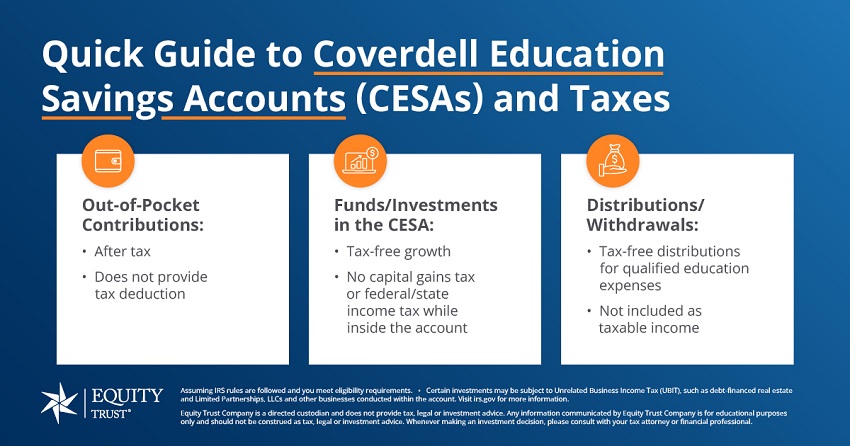
No – Contributions to a CESA are not tax deductible. Individuals contribute to a Coverdell ESA with after-tax dollars, but those contributions can then grow tax-free through potential profits from the investments that you’re making. When money is withdrawn to pay for qualified education expenses, it’s tax-free.
6. Are there income limits associated with CESAs?
Yes – There are what’s referred to as Modified Adjusted Gross Income (MAGI) limits.
If you’re single in 2023, and you make between $95,000 and $110,000 MAGI, you can only make a partial contribution to a CESA account. This is what’s referred to as the phase-out range. As you get closer to that $110,000, you can only put a small fraction of the full $2,000 allowable limit on an annual basis.
Once your income is over $110,000, unfortunately you cannot contribute to a child or grandchild, or other family member’s Coverdell ESA.
If you’re married and filing jointly, and your MAGI is between $190,000 and $220,000 the contribution limits decrease and as you reach $220,000, you cannot contribute to a CESA.
Visit the IRS website for worksheets to help you determine MAGI and contribution limits.
7. When must assets be distributed from the account?
Assets must be distributed when the beneficiary turns 30 (rule doesn’t apply to a special-needs beneficiary).
If there’s a balance in the CESA at the time the beneficiary reaches age 30 or dies (if earlier), it must be distributed within 30 days. A portion representing earnings on the account will be taxable and subject to the additional 10-percent tax.
The beneficiary may avoid these taxes by rolling over the full balance to another beneficiary who is under the age of 30.
8. What’s the difference between a 529 savings plan and a Coverdell Education Savings Account?
Typically, with a 529 plan you get a tax deduction for making contributions to the plan, however, you’re restricted on the types of investments you can make with the funds.
Whereas with a Coverdell ESA, you can invest in just about anything as long as your following the rules and regulations associated with other self-directed accounts.
Can I have both a 529 and a Coverdell Education Savings Account?
Join over 100,000 subscribers who receive investing and wealth-building news and education in their inbox.
You are leaving trustetc.com to enter the ETC Brokerage Services (Member FINRA/SIPC) website (etcbrokerage.com), the registered broker-dealer affiliate of Equity Trust Company. ETC Brokerage Services provides access to brokerage and investment products which ARE NOT FDIC insured. ETC Brokerage does not provide investment advice or recommendations as to any investment. All investments are selected and made solely by self-directed account owners.
We use cookies to improve your experience on our site. By using our site, you consent to cookies.
Cookie Preferences
When you visit our website, we and our vendors use cookies and other online tracking technologies ("Cookies") to enhance user experience, analyze website performance and traffic, and provide marketing and advertising.
We use certain Cookies to enable the website to function, including for website security and to remember your settings and privacy preferences. These Cookies are always active. You can set your browser to block or alert you about these Cookies, but if you block these Cookies, some parts of the website may not function properly.
A sale of personal information can refer to disclosures of personal information to third parties who may use the information for their own purposes, such as Cookie vendors. Similarly, sharing personal information refers to disclosing personal information to third parties for cross-context behavioral advertising. In this context we sell and share personal information through our website. If you would like to opt out of sales and sharing for cross-context behavioral, please opt out of the Targeting and Analytics sections below. If you choose to use the Global Privacy Control (GPC) browser signal, you will be opted out of sales and sharing for cross-context behavioral advertising associated with the browser for which you have enabled the signal. If you use multiple browsers or devices, you will need to activate the signal for each one that you use.
You can manage your Cookies at any time by clicking the "Do Not Sell or Share My Personal Information" link in the footer of the website.
Please see our Privacy Policy for more information about our privacy practices.
These Cookies are necessary for the website to function and are always active. These Cookies are used, for example, for the security of our website and to administer your privacy preferences. You may configure your browser to block or alert you about these Cookies, but some parts of the website may not function properly if you do so.
Name
Description
Duration
Geolocation Config
This cookie is used to store the consent settings based on the visitor's location.
365 days
Cookie Preferences
This cookie is used to store the user's cookie consent preferences.
365 days
CloudFlare provides web performance and security solutions, enhancing site speed and protecting against threats.
The _cfuvid cookie is only set when a site uses this option in a Rate Limiting Rule, and is only used to allow the Cloudflare WAF to distinguish individual users who share the same IP address.
session
cf_clearance
Whether a CAPTCHA or Javascript challenge has been solved.
session
__cfseq
Sequence rules uses cookies to track the order of requests a user has made and the time between requests and makes them available via Cloudflare Rules. This allows you to write rules that match valid or invalid sequences. The specific cookies used to validate sequences are called sequence cookies.
session
cf_ob_info
The cf_ob_info cookie provides information on: The HTTP Status Code returned by the origin web server. The Ray ID of the original failed request. The data center serving the traffic
session
cf_use_ob
The cf_use_ob cookie informs Cloudflare to fetch the requested resource from the Always Online cache on the designated port. Applicable values are: 0, 80, and 443. The cf_ob_info and cf_use_ob cookies are persistent cookies that expire after 30 seconds.
session
__cfwaitingroom
The __cfwaitingroom cookie is only used to track visitors that access a waiting room enabled host and path combination for a zone. Visitors using a browser that does not accept cookies cannot visit the host and path combination while the waiting room is active.
session
cf_chl_rc_i
These cookies are for internal use which allows Cloudflare to identify production issues on clients.
session
cf_chl_rc_ni
These cookies are for internal use which allows Cloudflare to identify production issues on clients.
session
cf_chl_rc_m
These cookies are for internal use which allows Cloudflare to identify production issues on clients.
session
__cfruid
Used by the content network, Cloudflare, to identify trusted web traffic.
session
__cf_bm
Cloudflare's bot products identify and mitigate automated traffic to protect your site from bad bots. Cloudflare places the __cf_bm cookie on End User devices that access Customer sites that are protected by Bot Management or Bot Fight Mode. The __cf_bm cookie is necessary for the proper functioning of these bot solutions.
session
__cflb
When enabling session affinity with Cloudflare Load Balancer, Cloudflare sets a __cflb cookie with a unique value on the first response to the requesting client. Cloudflare routes future requests to the same origin, optimizing network resource usage. In the event of a failover, Cloudflare sets a new __cflb cookie to direct future requests to the failover pool.
session
Google Tag Manager loads the site's other analytics and advertising tags. It sets no cookies of its own; each tag it loads is listed under its own category and only runs with the consent that category requires.
Set on m.stripe.com to help Stripe detect fraudulent payments.
2 years
These Cookies help us understand how visitors interact with our website by collecting information about usage, traffic, and website performance. This information helps us improve the website and user experience.
Crazy Egg records how visitors scroll, click and move through pages (heatmaps and session recordings). Form fields are masked before any data leaves the browser.
Set by Cloudflare on Unbounce's content domain (js.ubembed.com) to distinguish people from automated traffic.
30 minutes
These Cookies are used by us and our advertising and marketing partners to deliver more relevant content and advertisements. They may collect information about your browser, device, and interactions across websites to help tailor advertising and measure campaign effectiveness.
Google Ads measures the results of advertising and builds audiences for showing relevant ads.
Identifies the browser to Reddit for advertising and measurement.
3 months
These Cookies enable enhanced features and personalisation, such as remembering your preferences and providing additional functionality. They may be set by us or our vendors. If disabled, certain website features may not operate as intended.
Calendly provides appointment scheduling for booking a consultation. The cookies below are set by Calendly's content delivery network.